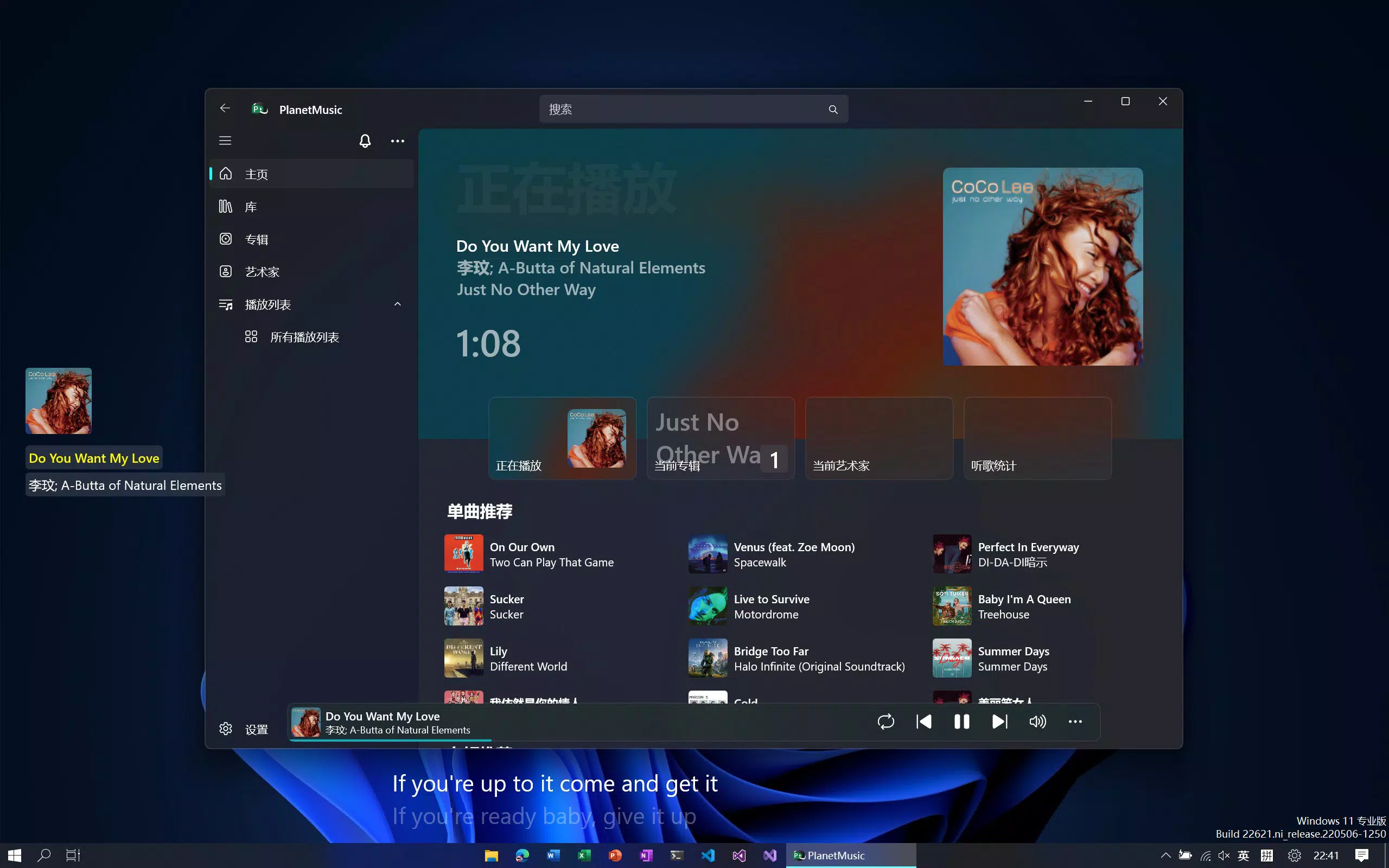

Download PlanetMusic – Music Player, UWP, LRC Lyrics, Desktop Lyrics Widget, External Storage, Music Organizer
Overview
PlanetMusic is a purpose-built music player designed for users seeking a refined and interactive listening experience on the Universal Windows Platform (UWP). It caters to individuals who value organization, lyrical engagement, and seamless access to their music collections across devices. The app addresses common pain points such as disorganized music libraries and the lack of synchronized lyrics during playback. By automating music categorization by artist and album, PlanetMusic streamlines the user’s music management process, eliminating the need for manual sorting.
Target users include audiophiles, music enthusiasts, and everyday listeners who want a clean, intuitive interface to explore their personal music collections. The app is particularly suited for those who frequently use external storage devices like USB drives or external hard drives to expand their music library. Its integration with the Xbox Game Bar desktop lyrics widget also appeals to multitaskers and gamers who wish to follow lyrics without switching applications.
Although the developer did not provide additional background information, the app’s focus on functionality and user experience suggests a targeted approach to enhancing the UWP music ecosystem. PlanetMusic fills a niche by combining organizational tools with real-time lyrical synchronization, offering a holistic solution for modern music consumption. Its release on January 27, 2025, marks a timely addition to the growing suite of UWP-native utilities.
Key Features & Functionality
- LRC Scrolling Lyrics: PlanetMusic features a real-time synchronized lyrics display using LRC file format, allowing users to follow along with songs as they play. This functionality enhances engagement, especially for those who enjoy singing along or learning lyrics. The scrolling mechanism ensures that the correct line is highlighted at the right moment, improving readability and immersion.
- Automatic Music Organization: The app automatically sorts music files by artist and album, creating a structured library that is easy to navigate. This feature is ideal for users with large or disorganized music collections, reducing the time spent searching for specific tracks or albums.
- External Storage Support: PlanetMusic supports playback from removable storage devices such as USB drives and external hard drives. Users can connect these devices directly to their Windows devices and access their music without requiring manual import or file copying.
- Desktop Lyrics Widget Integration: Through integration with the Xbox Game Bar, PlanetMusic enables a persistent lyrics display on the desktop. This allows users to view lyrics while gaming, working, or using other applications, making it a versatile tool for multitaskers.
For example, a user with a USB drive full of music can plug it in and immediately begin browsing their library by artist or album. Meanwhile, the LRC lyrics feature ensures that every song’s lyrics are displayed in real time, enhancing the listening experience. The desktop widget allows a gamer to follow lyrics during a break, without leaving the game. These features work in tandem to deliver a cohesive and user-centric experience.
Interface, UX & Performance
PlanetMusic features a clean, minimalist interface with a focus on usability and visual clarity. The layout emphasizes album art, artist names, and track listings, making navigation intuitive for users of all skill levels. The use of consistent typography and color schemes contributes to a polished aesthetic that aligns with modern UWP design principles.
Navigation is streamlined through a bottom tab bar and a side panel for library access. Users can switch between playlists, recently played tracks, and categorized music with minimal taps. The app responds promptly to user input, with smooth transitions and minimal lag during playback and library browsing.
Although the developer did not list formal performance metrics, the app’s lightweight size of 25.7 MB suggests efficient resource usage. It is expected to perform well on a range of UWP-compatible devices, from tablets to desktops. The app maintains stability during extended playback sessions and handles large music libraries without noticeable slowdowns. Responsiveness is maintained across different screen sizes and input methods, including touch and mouse.
Platform Compatibility & Technical Requirements
PlanetMusic is available exclusively on the Universal Windows Platform (UWP), making it compatible with Windows 10 and Windows 11 devices that support UWP applications. The app requires a minimum of 25.7 MB of storage space, which is relatively compact for a music player with advanced features.
Specific OS version requirements were not listed by the developer. However, given the UWP platform’s system requirements, the app is expected to function on devices running Windows 10 version 1809 or later. The app does not require root access or special permissions beyond standard file system access for music playback and external storage.
Compatibility with specific hardware configurations or device types was not disclosed. Users are advised to ensure their device supports UWP apps and has the necessary drivers for external storage devices.
Pros and Cons
Pros
- Automatic organization of music by artist and album reduces manual effort.
- Real-time LRC scrolling lyrics enhance the listening experience.
- Support for external storage enables flexible music access.
- Integration with the Xbox Game Bar desktop lyrics widget offers multitasking convenience.
- Lightweight size ensures efficient performance on various devices.
Cons
- Exclusive UWP platform limits availability to Windows users.
- Developer did not provide detailed system requirements or compatibility notes.
- No built-in music streaming or cloud sync features.
- Price point of $2.99 may deter casual users seeking free alternatives.
- Limited to local music files; no support for online radio or podcast integration.
FAQ
Is PlanetMusic available for Android or iOS?
PlanetMusic is designed for the Universal Windows Platform (UWP) and is currently only available on Windows 10 and Windows 11 devices. It is not available for Android or iOS platforms.
Can I use PlanetMusic with USB drives and external hard drives?
Yes, PlanetMusic supports playback from removable storage devices such as USB drives and external hard drives. Simply connect the device to your Windows PC or tablet, and the app will detect and allow access to your music files.
How do I enable the desktop lyrics widget?
The desktop lyrics widget is integrated with the Xbox Game Bar. To use it, ensure the Game Bar is enabled in Windows Settings, and the lyrics feature is activated within PlanetMusic. The widget will then display lyrics on your desktop during playback.
Does PlanetMusic require internet access?
PlanetMusic operates primarily with local music files and does not require an internet connection for playback. However, the desktop widget may need background access to the system for real-time display.
Is PlanetMusic free to download?
No, PlanetMusic is a paid application priced at $2.99. There is no free version or trial period available at this time.
Final Thoughts
PlanetMusic delivers a focused, well-structured experience for Windows users who prioritize music organization and lyrical engagement. Its automatic library sorting, real-time LRC lyrics, and external storage support make it a powerful tool for managing and enjoying local music collections. The integration with the Xbox Game Bar adds a unique edge, especially for users who value multitasking during music playback.
While its exclusive UWP availability and paid model may limit its reach, the app offers strong value for dedicated Windows users seeking a polished, feature-rich music player. It stands out in a crowded market by combining practical organization tools with immersive lyrical features.
Download PlanetMusic now


